

You set up a Facebook ad for your real estate listing, mortgage service or job opening. Then you notice something strange: you can’t choose age, you can’t target a ZIP code, and half the targeting options have disappeared.
Welcome to Meta’s Special Ad Categories.
If you advertise housing, jobs, credit or financial services, these rules apply to you. They can feel frustrating at first, but once you understand them, you can still run successful campaigns. Here’s everything explained simply.
Note: Meta updates these rules from time to time, and they can vary by country. Always check Meta’s current policies before launching. This article is general information, not legal advice.
Why Do These Rules Exist?
In the US, laws like the Fair Housing Act, equal employment laws and fair lending laws make it illegal to discriminate based on things like age, gender, race, religion or family status.
In the past, ad platforms made it possible, sometimes by accident, to show housing, job or credit ads only to certain groups. After legal action and settlements, Meta created Special Ad Categories so these important opportunities are shown more fairly.
Which Ads Count as “Special”?
| Category | Examples |
|---|---|
| Housing | Homes for sale or rent, real estate listings, mortgages, home insurance, home appraisal services |
| Employment | Job openings, recruitment, job fairs, staffing agencies |
| Financial products and services (previously “Credit”) | Credit cards, loans, financing offers and, increasingly, other financial products. Check Meta’s current definitions. |
| Social issues, elections or politics | Ads about political candidates, elections or social issues (these have their own separate authorization rules) |
If your ad fits one of these, you must declare it when creating your campaign. If you don’t, Meta may reject your ads, and repeated issues can put your account at risk.
What Changes When You Declare a Special Ad Category?
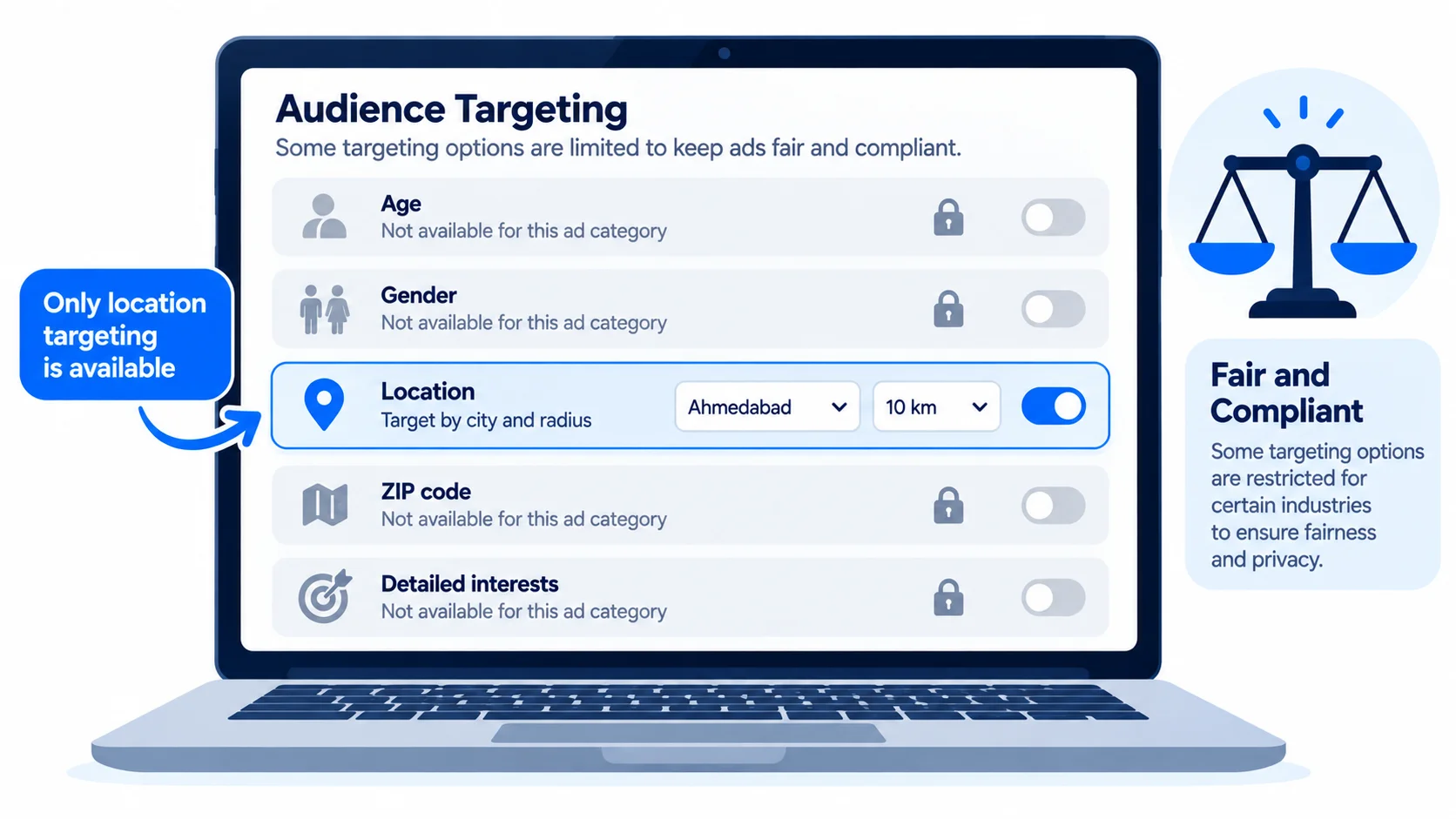
Here’s what’s generally limited for Housing, Employment and Financial ads in the US:
- ❌ No age targeting. Ads must reach a broad adult age range.
- ❌ No gender targeting. Ads must be shown to all genders.
- ❌ No ZIP code targeting. Location targeting must be broader, typically a minimum radius around a city or address.
- ⚠️ Limited detailed targeting. Many interest and behavior options are removed, especially anything that could relate to protected characteristics.
- ⚠️ Lookalike-style audiences are limited or unavailable.
Meta also uses systems designed to make sure ads are delivered more fairly across different groups of people. For how audiences normally work, see Meta Ads targeting explained.
Google Has Similar Rules
Google Ads also restricts targeting for housing, employment and credit ads in the US and Canada. You can’t target or exclude by gender, age, parental status, marital status or ZIP code. So these limits aren’t just a Meta thing. They’re the standard for fair advertising.
How to Still Get Great Results
1. Let your ad do the targeting
When you can’t narrow your audience with settings, your ad itself must attract the right people. Be clear and specific:
- ✅ “3-bed family homes in Plano from $450K. Book a tour this weekend.”
- ✅ “Hiring licensed HVAC technicians in Phoenix. $30–$40/hr + benefits.”
- ✅ “Small business loans from $25K. Check your options in 2 minutes.”
The right people will lean in. The wrong ones will scroll past, and that’s what you want. Our guide to writing ad copy that gets clicks has more examples.
2. Use strong visuals
Real photos of the property, your workplace or your team build trust and help people self-select.
3. Use Lead Ads with smart questions
Meta’s Instant Forms can include qualifying questions, as long as they don’t ask about protected characteristics. For example:
- Real estate: “When are you planning to buy?” or “Are you pre-approved?”
- Jobs: “Do you have a valid HVAC license?”
- Finance: “How much funding are you looking for?”
Always check that your questions follow Meta’s rules and fair lending, housing and employment laws.
4. Get your location right
Choose cities or a radius around your office or property that makes sense for your business. Don’t try to work around the rules with tiny areas. It won’t work and can get ads rejected.
5. Follow up fast and track quality
Broader targeting means you may get a wider mix of leads. Fast follow-up and good qualifying questions help you find the serious ones. See how to respond to leads in under 5 minutes.
6. Use Google Search alongside Meta
People searching “homes for sale in Austin” or “HVAC technician jobs near me” are already interested. Search ads are a great complement to Meta’s broader reach.
Common Mistakes to Avoid
- Not declaring the category. This leads to rejections and account problems.
- Using language that excludes groups, like “perfect for young professionals” or “ideal for singles”. Keep language inclusive.
- Trying to work around the rules with tricky targeting or separate accounts.
- Judging results too early. Broader audiences can take a little longer to optimize.
Quick Answers to Common Questions
Does a home cleaning or moving company need a Special Ad Category?
Usually not. The category is mainly for ads that offer housing itself, housing-related financing and similar services. If you’re unsure, check Meta’s definitions or ask your ads partner.
Do these rules apply outside the US?
Meta has expanded some of these rules to other countries over time. Check the current policy for each country you advertise in.
Can I still retarget website visitors?
Options are more limited in Special Ad Categories. Check what’s currently available in Ads Manager when you set up your campaign.
The Bottom Line
Special Ad Categories exist to keep housing, jobs and financial opportunities fair. They limit targeting, but they don’t stop you from getting results. Clear, specific ads, good visuals, smart qualifying questions and fast follow-up make up for most of what the targeting settings take away.
See how we help businesses in these industries on our real estate, accounting and finance, insurance and fintech pages. New to Meta? Start with our guide on how to start Meta Ads with $1,500 a month.
Related Reading
- Google and Meta Ads for Real Estate Agents: Getting More Buyer and Seller Leads
- Google and Meta Ads for Fintech Companies: Growth Within the Rules
- Google and Meta Ads for Insurance Agencies: Getting Quality Leads Without Buying Shared Ones
👉 Get a free Meta Ads audit. We’ll check that your campaigns are set up correctly and show you how to get better leads within the rules.