

Most clinic owners have never seen their Meta Pixel. It’s a tiny piece of code, usually added by a web developer or agency years ago, sitting quietly on the website.
But that tiny piece of code can send a lot of information to Meta, and for healthcare businesses, some of it may be sensitive.
This guide explains what the pixel does, where the risk comes from, and practical steps to keep running Facebook and Instagram ads more safely.
Important: this is general information, not legal advice. Please work with a healthcare compliance professional or attorney on your specific setup, and verify current rules with official sources. For the bigger picture, read our guide on HIPAA and paid ads for healthcare clinics.
What Is the Meta Pixel, Really?
The Meta Pixel is code that tracks what people do on your website after seeing your ads. It helps Meta:
- Measure which ads bring results
- Show ads to people who visited your site before
- Find more people likely to become patients
For most businesses, this is harmless and useful. For healthcare, it needs extra care.
What the Pixel Can Collect
Depending on how it’s set up, the pixel can send Meta information like:
| Information | Example | Why it matters in healthcare |
|---|---|---|
| Page address (URL) | /services/addiction-treatment | Can reveal what care someone is looking for |
| Button clicks | “Book HIV test” | Can reveal specific health needs |
| Form fields | Symptoms, conditions, date of birth | Can be protected health information |
| IP address and device info | Automatically collected | Can help identify a person |
| Facebook login cookie | If the person uses Facebook | Links activity to a real profile |
Combine a page like “/book-fertility-consultation” with a visitor’s identity, and you may have shared sensitive health information without meaning to.

A Step-by-Step Plan to Reduce Risk
Step 1: Find every pixel and tag on your site
Ask your developer or agency to list every tracking tool on your website and which pages it’s on. You can also use browser tools like Meta Pixel Helper to spot it. Many clinics find old or duplicate tags they didn’t know about.
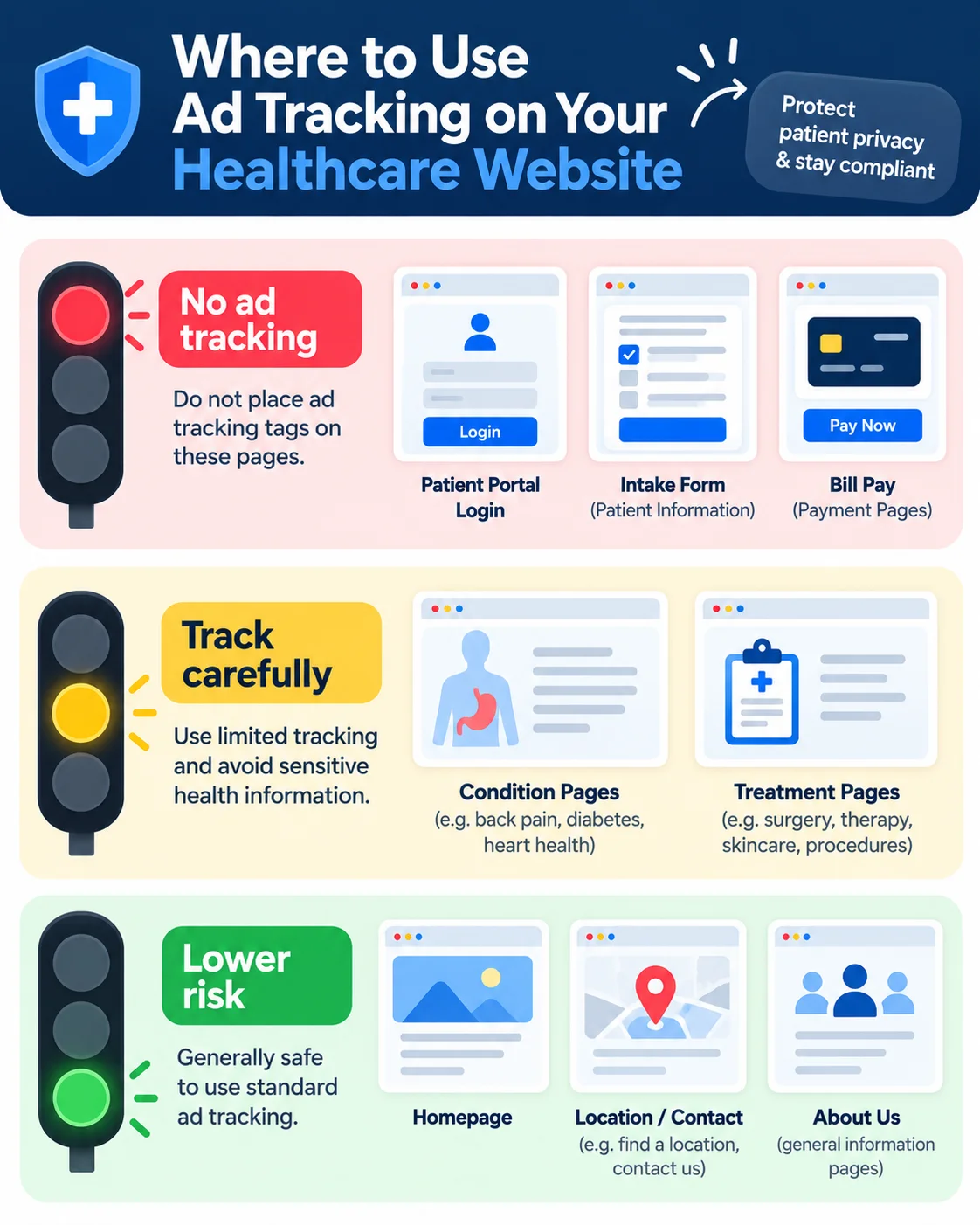
Step 2: Map your sensitive pages
Make a simple list:
- 🔴 High risk: patient portal, online intake forms, appointment booking with medical details, bill pay, pages after login
- 🟡 Medium risk: pages about specific conditions or treatments
- 🟢 Lower risk: homepage, “About us”, general contact, location pages
Step 3: Remove the pixel from high-risk pages
Ad tracking shouldn’t be on patient portals, intake forms or logged-in areas. Remove it completely from these pages.
Step 4: Stop sending detailed data
- Turn off automatic form and button tracking features that capture more than you need.
- Don’t send form contents, symptoms or treatment names as event details.
- Use one generic thank-you page (like “/thank-you”) for all appointment requests, instead of condition-specific ones.
Step 5: Consider a safer tracking setup
Some healthcare organizations use:
- Server-side tracking that filters out sensitive details before anything reaches Meta
- Healthcare-focused tracking tools that sign a Business Associate Agreement (BAA)
- A consent banner that lets visitors choose whether to allow marketing tracking
These options vary in cost and complexity. Your compliance team should help choose.
Step 6: Build audiences carefully
- Don’t create retargeting audiences based on condition pages
- Don’t upload patient lists without legal review
- Use broader targeting, like location, age range and general interests in health and wellness
Step 7: Review regularly
Websites change. New pages, plugins and forms get added. Check your tracking setup at least every few months.
Can You Still Get Good Results From Meta Ads?
Yes, though you may need to adjust your expectations and approach:
- Lead Ads (Instant Forms) keep the form inside Facebook or Instagram. Keep questions general, like name, phone and preferred location, and avoid asking about conditions.
- Strong, positive creative matters more when tracking is limited. Show your team, your clinic and the patient experience.
- Measure outside the pixel too. Count appointment requests in your own booking system and compare them with ad spend.
- Use Google Search for high-intent patients. People searching “dentist near me” or “physical therapy [city]” are already looking.
Meta has also been limiting some tracking and optimization options for health-related advertisers, so a simpler, privacy-first setup can also help you avoid disruptions.
Quick Answers to Common Questions
Should my clinic remove the Meta Pixel completely?
Some healthcare organizations do. Others keep it only on low-risk pages with limited data. Your compliance advisor can help you decide what’s right for your situation.
Is the Conversions API safer than the pixel?
Not automatically. It depends on what data you send. The Conversions API can be set up to send less sensitive data, but it can also send more if configured carelessly.
Does this apply to small practices too?
HIPAA applies to covered entities of all sizes. Small practices should take this just as seriously as large hospitals.
The Bottom Line
The Meta Pixel is a powerful tool, but on healthcare websites it needs careful handling. Find every tag, keep it off sensitive pages, send only general data, build audiences carefully, and review your setup regularly with your compliance team.
Explore our healthcare and wellness marketing work and our Meta Ads services. If you run an aesthetic clinic, see our guide on Meta Ads for med spas.
👉 Book a free healthcare ads audit. We’ll review your ads and tracking tags and flag potential privacy risks for your compliance team to review.
Disclaimer: This article is for general information only and is not legal or compliance advice. Prices, features, policies, laws and results can change or may not apply to your situation, and we do not guarantee accuracy, outcomes or future performance. Please verify important details, including pricing and commitments, with the official source or website, or a qualified professional, before acting on them.